Monday, 15 October 2012

Latest RedSn0w 0.9.15b1 Releases!


iPhone Dev-Team Releases RedSn0w 0.9.15b1 Re-restore your device to iOS 5.x using SHSH blobs!


Today we’re pleased to release redsn0w version 0.9.15b1, with significant new features supporting restoring to older firmware no longer being signed by Apple. For brevity, we’ll list most of the new features in bullet form.
First, the high-level new feature list:
restore from any 5.x iOS to any other (up, down or the same) 5.x iOS on all devices as long as you have the correct blobs (see more below)
Cydia now included in the tethered 6.0 jailbreak on A4 devices
automatically “Just Boot” tethered when qualifying A4 device connects in DFU mode
untethered 6.0 jailbreak on old-bootrom 3GS
untethered 6.0 hactivation on any 3GS or iPhone4
directly restore pre-A5 devices to earlier firmware — no more complicated 15-step how-to’s with stitching, iTunes errors, and “hosts file” concerns
fetch new signed blobs for any IPSW (present or future — no redsn0w update required) using Extras->SHSH Blobs->New
block the BB update for any 3GS or iPhone4 restore (past, present, or future — no redsn0w update required) using Extras->Even More->Restore
deactivate any iPhone, useful for testing your “official” unlock status through iTunes. (Please only deactivate your own iPhone!)
activation status shown on “Even more” page
significantly more (very nerdy) info returned by “Identify” button when device is in Normal mode
tethered jailbreak of ATV2 supported (but the only thing available for it is the SSH2 custom bundle available here — no Cydia yet. Must use “Select IPSW” for tethered boot of ATV2 for now).
auto-exit DFU mode for older devices with broken buttons
any time a set of blobs is fetched remotely (from Apple or Cydia), redsn0w also saves them locally (and will check there first if you click “Local”)
for your future restoring convenience, you should also submit all of your past and present TinyUmbrella blobs to Cydia if you haven’t done so yet. Resubmitting is okay and won’t cause conflicts.

Details on the iOS5-to-iOS5 restores for A5+ devices
(Note: pre-A5 devices don’t have these restrictions — just follow the redsn0w prompts during the restore).

1. redsn0w now lets you restore an A5+ device from any iOS5 to any other iOS5 as long as you have correct 5.x blobs for the starting (current) and ending points of the restore
APtickets eliminated “higher-version only” comparison of firmware restores (just like BBtickets did for the baseband)
example restores supported by redsn0w if you have the correct blobs: 5.1.1-to-5.0.1, 5.0.1-to-5.1.1, 5.1.1-to-5.1.1, 5.0.1-to-5.0.1
if you don’t have the blobs locally, let redsn0w try to fetch them remotely (redsn0w always tries both Apple and Cydia). Any succesful remote fetch also saves a local copy too.

2. You DO NOT QUALIFY for iOS5-to-iOS5 restores if you got to your current 5.x via an OTA update
the tickets saved by Cydia, redsn0w, and TinyUmbrella do not cover OTA update ramdisk images
even if they did, it’s the “wrong kind” of ramdisk (you’d need to start at that earlier pre-OTA FW)
devices fresh from factory or refurb may fall in the “does not qualify” category (your results will vary)
it’s okay if you previously got to 5.x via an OTA update, as long as your current 5.x was installed via a normal iTunes restore. All that matters is how you got to your current 5.x most recently
redsn0w detects an OTA/normal-restore APticket mismatch very early, so if you don’t know your status there should be no harm in trying. Any device in recovery mode after such a mismatch can boot normally again just by going back to “Even More” screen from the “Restore” screen (or use “Recovery Fix” if you quit redsn0w before doing that).

3. Unlike the A4 devices, redsn0w can’t (usefully) prevent the baseband updates of A5+ iPhones and iPads.
and so, redsn0w automatically flashes the currently signed baseband when it does A5+ restores, even if those basebands didn’t come with the original firmware
stay away from this if you have an unofficial unlock that isn’t supported by the newest baseband
the least-tested baseband update code in redsn0w is for iPad2,3 and iPad3,2. Please give any feedback on those iOS5 restores in the comments section below.

4. iPad2 owners (all three models) with saved 4.x blobs can use those instead, even from 6.x
if you have both 4.x and 5.x iPad2 blobs, you can always get to 5.x via the 4.x blobs, even if you’re currently on 6.x
you cannot get to 5.x from 6.x without the 4.x blobs (but you may still qualify for the iOS5-to-iOS5 restore described above)
if somehow you have 4.x blobs but no 5.x blobs, you can still go down to 4.x from 6.x
this only applies to iPad2 owners (they’re the only A5+ devices that ever had a public 4.x FW)
redsn0w still supports (but doesn’t require) jailbreaking A5+ devices at 5.0.1 and 5.1.1. Just head back to the first page after re-restoring to 5.x. It’s always much faster to jailbreak those FW versions with a freshly-restored device, before letting iTunes restore from a saved userland backup.
And finally, some random details:

5. ultrasn0w isn’t yet updated for 6.x
by now you probably should be taking advantage of the extremely cheap IMEI-based unlocks of iPhones sold by established online retailers like http:://cutyoursim.com
still, IMEI-based unlocks don’t work in all cases. We’ll announce when ultrasn0w is ported up to 6.x
redsn0w will still hactivate your 3GS or iPhone4 if you run it before the device is activated. Due to the current tethered 6.x JB status, redsn0w now hactivates 6.x without requiring subsequent tethered boots. If you accidentally hactivate with redsn0w, use the “Deactivate” checkbox available from the Jailbreak screen, not the normal one in “Even more”

6. As always, redsn0w lets you “Fetch” the SHSH blobs currently flashed onto your pre-A5 device
use this if you’re at 5.x or 4.x but without having saved your blobs when the window was open
this is only useful when Apple is no longer signing the firmware, otherwise Cydia/redsn0w “New”/TinyUmbrella blobs are superior (but you’re welcome to fetch your 6.0 blobs this way anyway)
fetching blobs in this fashion will automatically forward them up to Cydia, as well as save a local copy
We realize there’s a lot of info in this post. If you’re at all confused about things remember to visit our comments section, with our very helpful user base and moderators like dhlizard, Frank55, 41willys, and slavakulikoff.

If you’re in the Melbourne, Australia area, MuscleNerd (and another anonymous long-time Dev Team member) will be giving some talks at the Breakpoint conference Breakpoint 2012 Security Conference this week. And @mdowd’s iOS talk at the same conference should be quite interesting too! We’ll also all be attending Ruxcon a few days later, so say hi if you see us!

Source - SinfuliPhone

Here are the download links. Enjoy!

redsn0w 0.9.15b1 (OS X — use Ctrl-Click->Open if on Mountain Lion for now)
redsn0w 0.9.15b1 (Windows — run in Adminstrator Mode)

Thursday, 4 October 2012

Micro SD Test On Windows 7

To anyone who has purchased the micro sd card can use the application below to test the data speed and size.
Source Of Application : CrystalDiskMark 3.0.1 (C) 2007-2010
Download here : CrystalDiskMark
Sample : * MB/s = 1,000,000 byte/s [SATA/300 = 300,000,000 byte/s]
OS : Windows 7  SP1 [6.1 Build 7601] (x86)
1.       Micro SD Card Class 2 8GB (SANDISK)
Test : 1000 MB [H: 45.4% (3440.8/7577.1 MB)] (x5)
Date : 2012/10/04 12:14:54
2.       Micro SD Card Class 10 32GB (SANDISK)
  Test : 1000 MB [H: 10.1% (3.0/29.7 GB)] (x5)
Date : 2012/10/04 13:23:13
RESULT
No.
Test Criteria
Read
Write
Class 2 8GB
Class 10 32GB
Class 2 8GB
Class 10 32GB
1
Sequential
15.814 MB/s
15.487 MB/s
7.117 MB/s
9.561 MB/s
2
Random 512KB
15.514 MB/s
15.527 MB/s
1.867 MB/s
6.705 MB/s
3
Random 4KB (QD=1)
3.708 MB/s [   905.3 IOPS]
3.818 MB/s [   932.2 IOPS]
0.019 MB/s [     4.6 IOPS]
1.338 MB/s [   326.7 IOPS]
4
Random 4KB (QD=32)
3.950 MB/s [   964.4 IOPS]
3.651 MB/s [   891.3 IOPS]
0.019 MB/s [     4.6 IOPS]
1.203 MB/s [   293.7 IOPS]

Tuesday, 2 October 2012

TinyUmbrella v6.00.01

After quite a delay... 6.0b and GM support
Sorry for the delay folks... with funerals and travel and changing jobs I've had quite the summer. I've updated TU for apple tv 5.0.2 (sorry for the wait!) as well as all of the iOS 6 betas. I've had to change the way the OSX app is packaged. No more installer for now as Gatekeeper sucks more than taxes.

So now it is a simple zip but you will have to give your admin password at the first launch (it shouldn't ask for it again after first launch).

Hope it helps!

::Changelog::
[v6.00.01]
Fix for iPad 2
Download here:
For Windows
For Mac

Monday, 3 September 2012

Bersalam Dengan Bukan Mahram

Assalamualaikum, yg benar itu Dia, yg salah itu saya.

Tergerak hati untuk menceritakan hukum bersalam dengan bukan muhrim terutamanya yg telah akil baligh.

Lihat pada zaman sekarang, berjabat tangan diantara lelaki dan wanita bukan mahram telah menjadi tradisi. Tradisi ini mengalahkan akhlak Islam yang semestinya ditegakkan. Bahkan mereka menganggap kebiasaan itu jauh lebih baik dan lebih tinggi nilainya daripada syariat Allah yang mengharamkannya. Sehingga jika salah seorang di antara mereka anda mengajak berdialog tentang hukum syariat, dengan dalil-dalil yang kuat dan jelas, tentu ia akan menuduh anda sebagai orang kolot, ketinggalan zaman, ekstrim, hendak memutuskan tali silaturrahim, menggoyahkan niat baik dan sebagainya. Alangkah ceteknya pemikiran atas apa yang mereka katakan.

Ketahuilah wahai saudara-saudariku Rasulullah Shallallahu ‘alaihi wa Sallam pernah bersabda:-
“Sungguh ditusuknya kepala salah seorang dari kalian dengan jarum dari besi lebih baik baginya daripada ia menyentuh wanita yang tidak halal baginya.” (Hadis riwayat ath-Thabrani dalam Shahihul-Jami’ hadits no. 4921).
Hadits ini menyatakan bahawa terlarang dan berbahayanya menyentuh wanita (bukan mahram) yang tidak halal bagi kita. Tentunya orang yang berakal sihat mengatakan bahwa berjabat tangan dengan wanita bukan mahram adalah suatu bentuk menyentuh yang terlarang.
Dan tidak diragukan lagi hal ini termasuk zina tangan, sebagaimana sabda Rasulullah Shallallahu ‘alaihi wa Sallam: “Kedua mata berzina, kedua tangan berzina, kedua kaki berzina dan kemaluan pun berzina.” (Hadits riwayat Ahmad 1/412; Shahihul-Jami’ 4126).
Ada yang berpendapat “tidak apa-apa salaman dengan wanita bukan mahram asalkan tidak diiringi nafsu”. Kami katakan: “pendapat ini adalah pendapat yang keliru (kalau tidak mahu dikatakan pendapat yang batil serta sesat dan menyesatkan)”. Kekeliruan pendapat ini dapat ditinjau dari dua alasan:

1. Rasulullah Shallallahu ‘alaihi wa Sallam telah melarang kita menyentuh wanita (bukan mahram) yang tidak halal bagi kita. Cuba perhatikan sabda Rasulullah: “Sungguh ditusuknya kepala salah seorang dari kalian dengan jarum dari besi lebih baik baginya daripada ia menyentuh wanita yang tidak halal baginya.” Dapat kita ambil pelajaran dari hadis ini bahawa Rasulullah melarang kita menyentuh wanita bukan mahram secara mutlak, baik yang tidak diiringi nafsu maupun yang diiringi nafsu. Jadi, tidak boleh bersalaman dengan wanita bukan mahram walaupun tidak diiringi nafsu.

2. Orang yang berpendapat “tidak apa-apa salaman dengan wanita bukan mahram asalkan tidak diiringi nafsu” adalah orang yang merasa hatinya lebih bersih dari hati Nabi Muhammad Shallallahu’alaihi wa Sallam. Rasulullah adalah orang yang paling bertaqwa dan lebih pandai mengendalikan hawa nafsunya daripada kita, namun beliau tidak pernah berkata demikian. Bahkan beliau Shallallahu’alaihi wa Sallam bersabda:
“Sesungguhnya aku tidak berjabat tangan dengan wanita”. (Hadits riwayat Ahmad 6/357, dalam Shahihul Jami’ hadits no. 2509). Apakah kita merasa lebih pandai mengendalikan hawa nafsu daripada Rasulullah?

Penutup

Jika suatu ketika kita menemukan seorang muslim yang taat, yang tidak mahu bersalaman dengan wanita (bukan mahram) yang tidak halal baginya. Maka janganlah kita berprasangka buruk dan tidak boleh mengatakan bahawa dia ingin memutuskan tali silaturrahim. Hendaklah kita berprasangka baik, bahawa saudara kita itu sedang mengamalkan agama Islam yang telah melarang bersalaman dengan lawan jenis yang tidak halal bagi dirinya.
Kami nasihatkan kepada Saudara-Saudari kami, kaum muslimin dan muslimat agar bertaqwa kepada Allah dan taat kepada Rasul-Nya, sehingga kalian memperoleh kemulian dengan Islam. Jika kalian bermaksiat kepada Allah dan Rasul-Nya maka kalian akan hina dan merugi dunia dan akhirat.
Tulisan ini kami tulis sebagai rasa cinta kami kepada kaum muslimin dan muslimat perindu surga, agar kita tergolong ke dalam orang-orang yang taat kepada Allah dan Rasul-Nya sehingga terhindar dari naar (neraka) yang penuh dengan berbagai siksaan yang menyakitkan, dan dimasukkan ke dalam jannah (surga) yang berisi berbagai kenikmatan, yang didalamnya mengalir sungai-sungai dan terdapat bidadari yang cantik bermata jeli. Rasulullah bersabda:
“Seandainya salah seorang wanita penghuni Jannah mendatangi penduduk bumi, niscaya ia akan memenuhinya dengan wewangian. Tutup kepala wanita itu lebih baik daripada dunia dan seisinya”. (HR. Bukhari, hadis no. 2796). Allahu Ta’ala a’lam.
Penulis Asal : Abu Aslam Benny al-Atsary as-Salafy.

Saturday, 4 August 2012

Civic B Series RPM Tuning

We tuning back RPM Idling after replacing intake part as:-

Throttle Body Servicing/Replace
Replace TPS Sensor
IACV Replace/Cleaning
Gasket Replace
Etc...

How?
1) Start ur engine after cool fan running (take 5-10 minutes).
2) Unsocket IACV sensor.
3) CEL appear. Ignore it.
4) Use Idle Screw to tune ur idling. Get it around 850rpm.
5) Off ur engine.
6) Socket back ur IACV sensor.
7) Remove negative battery at least 1-5 minutes (depends).
8) Then plug in back negative cable.
9) Done.

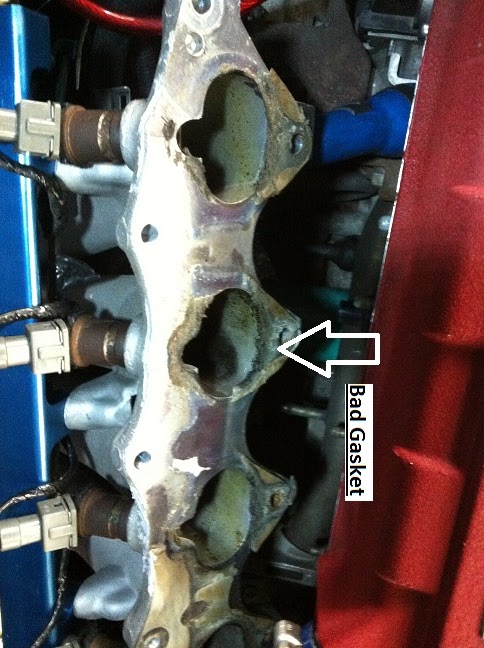
Replace Civic B16A/B/B20 Intake Gasket

Baru ni kereta aku buat hal. unstable idling. 1st round clean IACV then ok but after fews day later the prob came back. Then clean the TB (using S90-heard complain fr many user facing idle prob). THat time make vacum test takde pulak leak. suspect TB problem. Bought Skunk2 Alpha Throttle Body 70mm buat cant solve idle problem. So test leak vacum again nah I found vacum leak betweek IM with Head (gasket broken). Replace new gasket for Intake Manifold (bought at Honda Sparepart RM35).

Tool required:-
1) Box 12/Spanner 12.
2) Knife.
3) Screw Driver.
4) Player.
5) IM Gasket.
6) Gasket Glue/Seal.
7) Cleaner.

Time Required:-
Depends. I make it by 1 hour.

STEP
1) Unsocket all the sensor (intake related as TPS Sensor/Map Sensor/IACV Sensor/Knock Sensor.
2) Remove Throttle Cable (use 12mm nut)
3) If u planning to replace intake gasket only, dun waste ur time to remove TB/IACV except u plan to service/clean.
4) Unbolt IM holder (from below IM hold to Block).
5) Unbolt IM nut & screw (12mm size). Theres 10 pcs?? (forgot)
6) To make easier, spray cleaner like WD40 to gasket then slowly remove.
7) Not necessary to remove completely IM/Fule Rail/Injector Wyre. Just make it have space to clean surface of both IM & Head (wheres gasket located). I was using knife to remove old gasket.
8) I prefer use gasket glue to avoid leaking somewhere around gasket but it doesnt matter.
9) Install back using back previous step.


Monday, 9 July 2012

Galaxy Note II Coming In August 2012?

Rumors that Samsung is cooking up a successor to the device which it will unveil at the end of August during the IFA 2012 consumer electronics show in Berlin. On top of this, it is rumored that the Galaxy Note II will come with a 5.5" display, which is slightly larger than the existing Galaxy Note’s 5.3" display. It will of course run Android 4.1 Jelly Bean, which is now the latest version of the operating system.
Under the hood, the device is believed to sport a more powerful quad-core processor – exactly which CPU still remains unknown – with the looming possibility of a camera megapixel bump to around 12 or 13 MP, a substantial boost from the existing 8MP camera on the device. But remember, image quality isn’t just in the megapixels; the actual lens and multiple other factors also play a pretty significant role in how well photos come out.
However, the device will not come with unbreakable plane display (UBP) technology, which is a precursor to the flexible display. Sources claim that the third iteration of the Galaxy Note is more likely to feature such technology.
As of June, the handful of a device had channel sales of over 7 million units. Definitely not bad, but it pales in comparison to the channel sales of the Galaxy S, and S II sales which have collectively topped 50 million worldwide (24 million Galaxy S units, and 28 million Galaxy S IIs have been sold globally).

Tweaks : Liberty (bypass jailbreak detection on iPhone)

Hi semua, developer for iphone Mr Ryley telahpun develop 1 useful tweaks utk iphone yg telah di jailbreak. Aku ada pm beliau mohon masuk...