Thursday, 1 September 2016

Trip : Memancing Ke Tasik Kenyir (Fishing at Kenyir Lake)

Trip ini telah dirancang sejak 2013! dan akhirnya berjaya direalisasikan pada 12-13 Mac 2016. Seramai 13 orang menyertai trip ini dan ringkasannya seperti di bawah.


Ringkasan

  1. Seramai 13 orang yg join. 12 dari KL sorang dari Kuantan.
  2. Menggunakan 4 buah kereta. 3 dari KL 1 Kuantan. Melalui Highway KL-Karak-Kuala Berang. Tol RM6+RM3+RM21. Masa diambil lebih kurang 7 jam untuk sampai dari KL ke Kuala Berang.
  3. Houseboat utk 2 hari 1 malam. Sewaan RM1500. Ada houseboat lebih mahal bergantung kepada size boat dan bilangan orang.
  4. Kos keseluruhan lebih kurang RM3000 termasuk kos pegi dan balik/makan minum/tol. Tiap orang menyumbang RM200 seorang.
  5. Hari pertama (Sabtu) sesi memancing dari pagi sampai petang. Malam BBQ, sambung mancing, Main daun, Karaoke dan tido.
  6. Hari kedua (Ahad) memancing pada pagi. Tengahari bergerak balik sambil singgah di Air Terjun. Sampai di Jeti jam 5 petang. Bergerak ke KL selepas makan kira-kira jam 6 petang.

Rumusan

  1. Jika ada hardcore memancing, seeloknya 3 hari 2 malam diambil utk meneroka lubuk-lubuk yg berpotensi.
  2. Ikan lebih mudah dipancing selepas musim tengkujuh. Memang sukar nk dapat ikan time kemarau seperti yg group aku alami.
  3. Umpan pula samada gunakan yg tiruan (untuk casting) atau hidup serta mati. Biasanya umpan hidup atau mati disediakan oleh tekong. Rujuk houseboat anda.
  4. Cari tekong housebuat yg ngam atau kenal bagi memudahkan mereka membawa anda ke spot terbaik untuk memancing. Usaha tangga kejayaan.
  5. Alhamdulillah ada juga ikan yg diperolehi dengan bantuan tekong dan awak-awaknya. Cara? rahsia. Hehe.
  6. Malam di Kenyir mmg sejuk. Tengahari panas. Kalu berani boleh terjun tp kena pandai berenanglah atau gunakan lifejacket.
  7. Sesetengah tempat (kebanyakannya) tiada network. Jadi hubungi insan tersayang sebelum ke situ.
  8. Bekalan untuk makan atas houseboat pastikan mencukupi. Jangan ingat ikan boleh dapat.
  9. Next trip - Royal Belum.
Pic 1 : Meeting sebelum trip

Pic 2 : Pagi di Kuala Berang

Pic 3 : Selfie sementa!


Pic 4 : Macam Signboard jalan padahal laluan air!

Pic 5 : Landing!


Pic 6 : Hehehe....

Pic 7 : Ikan mane ko ikan...

Pic 8 : Mandi jap

Pic 9 : Sarapan pagi. Lapo beb!


Pic 10 : Seram tak? Dalam tu...

Pic 11 : Allahuakhbar. Cantik pemandangan dia!


Pic 12 : Mandi dulu di jeram sebelum balik!

Pic 13 : Bergambar sebelum balik

Pic 14 : Makan tengahari sebelum pulang ke KL

Pic 15 : Hasil kutipan. Hehe....

Pic 16 : Huhuhu....


Pic 17 : Otw balik KL


Apple Apps : Record Your iPhone Home Screen Using iRec 2.0 On iOS 9.X (Without Jailbreak)

This application (.ipa) is having a soft-launched right now. So you better hurry up before it too late!

  1. Go to iRec official site by clicking here (on your computer)
  2. Scroll down and click on Download IPA under iRec for iOS 9-10
  3. Click here to get Cydia Impactor
  4. Drag and drop the .iPA onto the software and sign in using your Apple ID
  5. After that, iRec will be signed and installed on your iPhone.
  6. Wait a few minutes for iRec to download on your device. Once the app’s icon is fully visible, launch it.
  7. Now that you’ve successfully record the screen of your iPhone, you have several options.
  8. Save it to the Camera Roll.
  9. Upload it to media streaming sites (YouTube, Twitch, etc.)
  10. Share it on Facebook, Twitter, or Google+


Credit : CydiaGeeks

Monday, 30 May 2016

Download Link For iOS 9.3.2 : May 2016

If you wanna jailbreak, please get fresh firmware to avoid problem during jailbreak. Never updated through OTA if you like to jailbreak!

iOS 9.3.2 (iPhone 4S): iPhone4,1_9.3.2_13F69_Restore.ipsw
iOS 9.3.2 (iPhone 5 GSM): iPhone5,1_9.3.2_13F69_Restore.ipsw
iOS 9.3.2 (iPhone 5 GSM+CDMA): iPhone5,2_9.3.2_13F69_Restore.ipsw
iOS 9.3.2 (iPhone 5s GSM): iPhone6,1_9.3.2_13F69_Restore.ipsw
iOS 9.3.2 (iPhone 5s GSM+CDMA): iPhone6,2_9.3.2_13F69_Restore.ipsw
iOS 9.3.2 (iPhone 5c GSM): iPhone5,3_9.3.2_13F69_Restore.ipsw
iOS 9.3.2 (iPhone 5c GSM+CDMA): iPhone5,4_9.3.2_13F69_Restore.ipsw
iOS 9.3.2 (iPhone 6 Plus): iPhone7,1_9.3.2_13F69_Restore.ipsw
iOS 9.3.2 (iPhone 6): iPhone7,2_9.3.2_13F69_Restore.ipsw
iOS 9.3.2 (iPhone 6s): iPhone8,1_9.3.2_13F69_Restore.ipsw
iOS 9.3.2 (iPhone 6s+): iPhone8,2_9.3.2_13F69_Restore.ipsw
iOS 9.3.2 (iPhone SE): iPhone8,4_9.3.2_13F69_Restore.ipsw

Tuesday, 5 January 2016

Best Fake Location Tweaks on iOS 9

Very Important this is rating from my experience.

1) Fake GPS Pro
2) Location Faker
3) AKlocationX


  1. Fake GPS Pro - USD19.99. The best so far for iOS9 but sometimes lagging and crash. Used cracked version before. Maybe latest update get improvement. I did email the dev to report the bugs. PRO : This tweak has Search function mean you can get list what r u looking for before make decision. CON : The EXPENSIVE tweak for the purpose! The price VERY UNREASONABLE! USD19.99 for permanent licence. Summary : Go To He*l. 
  2. Location Faker - USD2.99. For this tweak, to search you can put Latitude and Longtitude to get correct location. PRO : Less bugs, stable, consistence update. CON : Limited searching function and configuration. Summary : can buy. 
  3. AKlocationX - FREE. Even the dev mention this tweak can use on iOS6 & 7 but confirmed can use on iOS9. PRO : Free. Less bugs. CON : Limited searching. Can only put latitude and longtitude to fake location. Summary : free to use. akLocationX iOS Settings


4) LocationHolic (USD9.99) - The best so far but for no reason, this tweak pull out from Cydia. WTH! Just burn my bucks. So this tweaks never update for iOS9. The dev Wang Yike. Summary : Go To Hel*

Sunday, 5 July 2015

Jailbreak iOS 8.4 With TaiG v2.3 On iPhone 6, 6 Plus, 5s, More

iOS 8.4 has been released, and so is TaiG v2.3 jailbreak for iOS 8.4. iPhone 6, 6 Plus, 5s, 5c, 5, 4s, all iPads and iPod touch 5 are supported. You can download it from below and then follow our guides on how to jailbreak your device on iOS 8.4.


Download iOS 8.4 from:
iOS 8.4 Download Links:

Download TaiG v2.3 for iOS 8.4 from here:

Jailbreak iOS 8.4 Using TaiG v2.3 On iPhone, iPad [How-To Tutorial] (Windows)

Source : Redmondpie

DIY : Customize Your Front Bumper Grill With Carbon Fiber Look/ Pasang Sticker Carbon Fiber Di Grill Bumper Kereta Anda

Model kereta Honda Civic FD2. Alatan yang diperlukan :

1) Grill
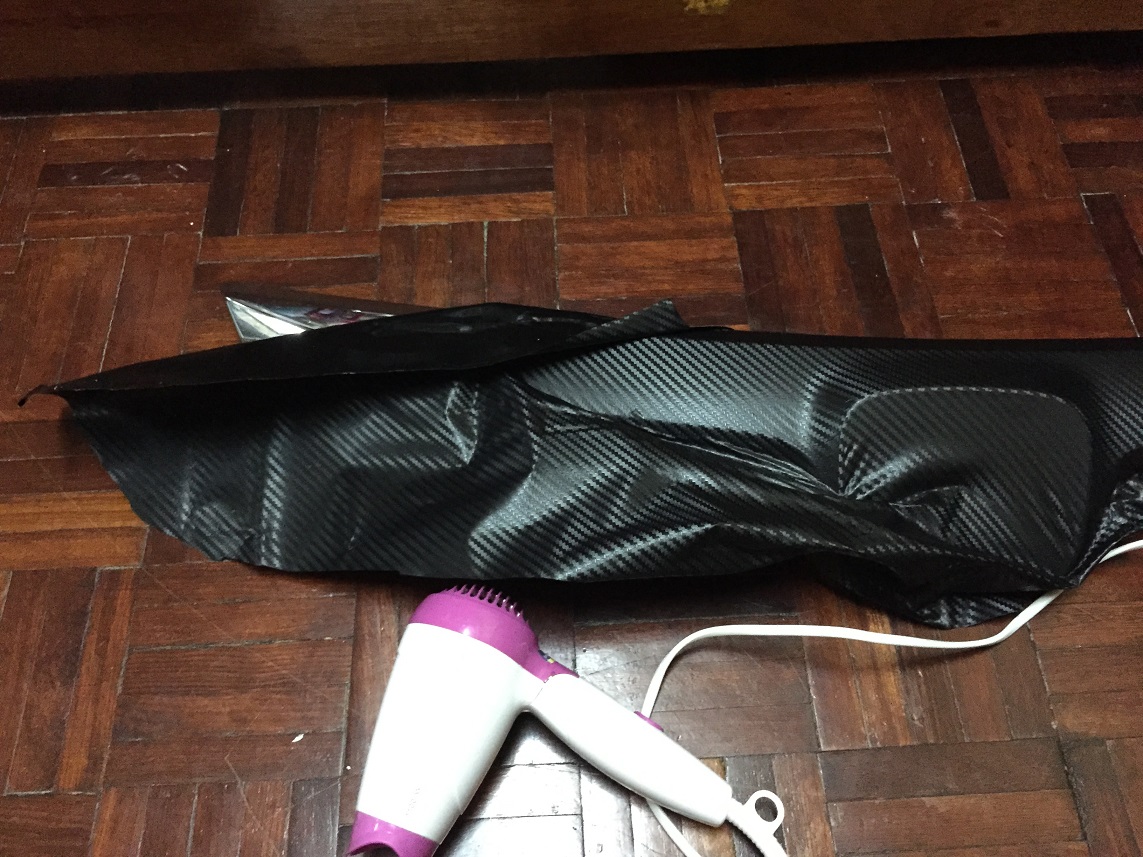
2) Carbon Fiber Sticker (Ukuran 3 X 3 Kaki)
3) Gunting
4) Hair Dryer
5) Air Sabun
5) Kesabaran

Tips.
  1. Ada 6 screw yg perlu dibuka untuk menanggalkan grill chrome dengan tapak dia.
  2. Sapu dahulu air sabun ke atas grill. Then letak sticker carbon fiber atas grill. Mulakan dari tepi.
  3. Gunting ikut ukuran grill. Pastikan dalam i inci lebih dari grill untuk dilipat ke dalam.
  4. Guna hair dryer jgn terlalu lama halakan di tempat yang sama takut sticker terlalu panas boleh menyebabkan koyak.
  5. Tekan atau gunakan jari anda untuk pastikan sticker melekat dengan kemas tanpa ada gelembung udara. Jika ada buka balik.Kebiasaannya dryer digunakan dikawasan grill yang berlekuk atau melengkung. Perlu berhati-hati tekan sticker ke atas permukaan ini. Dryer memudahkan sticker melekat di kawasan yang melengkung. Proses untuk ini mengambil masa 1 jam untuk orang macam aku yang tidak berapa pandai.
  6. Siap.
  7. Memandangkan bracket bumper sudah patah sebab accident dulu. Beli baru sebelah RM40.


Sekian.

Photo 1

 Photo 2

 Photo 3


Photo 4

Photo 5

Photo 6

Photo 7

Wednesday, 24 June 2015

Jailbreak iOS 8.3/8.2/8.1.3 With Taig 2.0


Yehaa! TaiG 2.0 iOS 8.3, iOS 8.2 and iOS 8.1.3 jailbreak is now out for iPhone 6 Plus, iPhone 6, 5s, 5c, 5, 4s, iPads and iPod touch. It is currently available for Windows only. So for mac version please be patient ok. But for ur information Cydia Substrate isn’t yet working, meaning that many third-party add-ons won’t run. MS Tweaks don’t work at present.

Just like the previous versions of TaiG, the tool covers all devices that support iOS 8.x. The full list is as follows:-
  • iPhone 6 Plus
  • iPhone 6
  • iPhone 5s
  • iPhone 5c
  • iPhone 5
  • iPhone 4s
  • iPad Air 2
  • iPad Air
  • iPad 4
  • iPad 3
  • iPad 2
  • iPad mini 3
  • iPad mini 2
  • iPad mini
  • iPod touch

Supported firmware version:

  • iOS 8.3
  • iOS 8.2
  • iOS 8.1.3

Here link for Taig for Windows.

Tweaks : Liberty (bypass jailbreak detection on iPhone)

Hi semua, developer for iphone Mr Ryley telahpun develop 1 useful tweaks utk iphone yg telah di jailbreak. Aku ada pm beliau mohon masuk...